Tampilkan postingan dengan label tips/trik blackberry. Tampilkan semua postingan

Solusi YM Yahoo Messenger BlackBerry Tidak Bisa Log In

Solusi untuk pengguna YM BlackBerry yang kesulitan/tidak bisa log in ke halaman akun YM anda, anda bisa mengikuti beberapa Trik dan Tips setting-an YM untuk BlackBerry berikut.
Sesuaikan Date/Time pada BlackBerry anda dengan server YM pada akun anda, caranya:
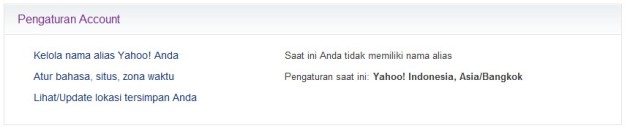
  • Log In halaman YM dari PC anda, lalu pilih “Atur bahasa, situs, zona waktu” (Saya menggunakan Yahoo.co.id bahasa indonesia)Solusi YM Yahoo Messenger Tidak Bisa Log In
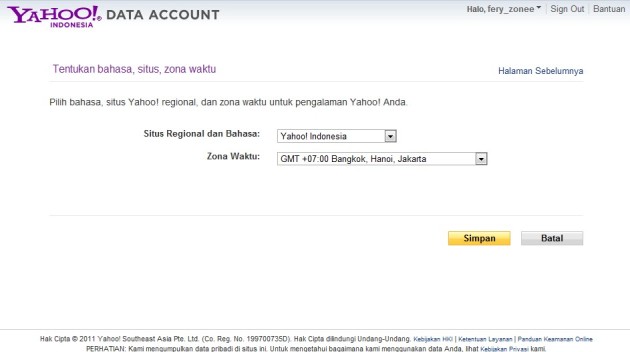
  • Sesuaikan zona waktu pada BlackBerry anda, misalkan saya berada di Jakarta, saya memilih GMT +07:00 Bangkok, Hanoi, JakartaSolusi YM Yahoo Messenger Tidak Bisa Log In
  • Log Out YM anda
  • Sekarang pada BlackBerry anda masuk ke aplikasi Clock (Jam pada BlackBerry anda), tekan tombol lambang BlackBerry pada device BlackBerry anda, pilih Set Time
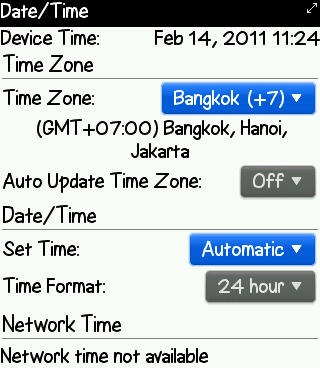
  • Sesuaikan pengaturan waktu pada BlackBerry anda dengan server YM anda (Ikuti pengaturan zona waktu pada akun YM anda tadi), lalu ubah Auto Update Time Zone ke OFF dan pada tab Date/Time ubah Set Time ke AutomaticSolusi YM Yahoo Messenger Tidak Bisa Log In
  • Kalau sudah mengikuti langkah di atas, Log In ke akun YM/Yahoo Messenger anda.
Sebelum melakukan langkah di atas, saya menyarankan anda untuk mencoba Log In YM pada BlackBerry anda dengan ID YM anda yang lain jika ID YM utama anda tidak bisa Log In untuk mengetahui sebab tidak bisa Log In nya akun anda. Kalau semua ID YM yang anda miliki tidak bisa Log In, ikuti pengaturan di atas.
Trik dan Tips Tambahan ID YM Tidak Bisa Log In ke Yahoo Messenger BlackBerry
Tambahan ini di peruntukan bagi anda yang sudah mencoba Log In dengan ID YM yang lain, tapi hanya ID YM utama anda yang tidak bisa Log In, caranya:
  • Log In ID YM Utama anda melalui PC, untuk mengetahui apakah ID YM anda di Hack atau di hapus oleh Yahoo karena sudah lama tidak di gunakan
  • Coba isi alamat ID YM anda dengan lengkap pada kolom Username. Example: alamat@yahoo.com
  • Re-Install Yahoo Messenger pada BlackBerry anda, hapus dahulu YM anda dan install ulang
Sekian trik dan tips BlackBerry saya, jika mengalami masalah mengikuti tips di atas silahkan tinggalkan pertanyaan anda pada kolom komentar di bawah artikel ini karena setiap komentar yang masuk langsung saya baca dari BlackBerry saya, Selamat Mencoba.
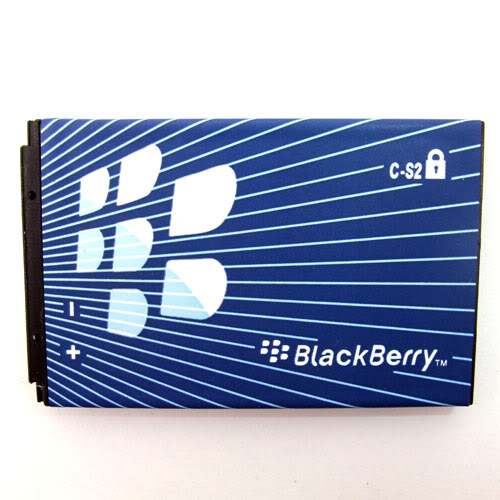
Solusi Kenapa Baterai BlackBerry Sering Panas dan Boros

Solusi Kenapa Baterai BlackBerry Sering Panas dan BorosAnda sering mengalami baterai BlackBerry anda suka panas dan boros? Semoga beberapa tips di bawah ini bisa anda jadikan solusi bagi yang sering mengalami baterai BlackBerry panas dan boros.
Alasan yang membuat baterai BlackBerry anda sering panas dan boros yaitu:
Jaringan Signal Lemah
Kenapa jaringan signal lemah bisa bikin baterai BlackBerry panas dan boros? Perlu anda ketahui, device BlackBerry anda akan selalu mencari signal, jika jaringan BIS anda lemah di daerah anda. Ketika device BlackBerry anda melakukan pencarian signal terus menerus maka penggunaan baterai BlackBerry anda akan lebih boros dan cepat panas.
Solusi untuk mengatasi device BlackBerry anda yang minim signal dan membuat baterai BlackBerry anda panas dan boros yaitu:
Gunakan jaringan 2G jika jaringan 3G di daerah tempat tinggal anda lemah. Untuk menganti jaringan 3G ke 2G, Buka menu Option>Mobile Network dan ubah Network Selection Mode ke Manual lalu ubah Network Mode ke 2G (Maaf saya tidak bisa menampilkan gambar karena saya menggunakan BlackBerry 8520 Gemini yang tidak memiliki jaringan 3G). Saya sarankan gunakan operator BIS yang memiliki jaringan signal kuat di daerah tempat tinggal anda.
Aplikasi Running di Background
Yang lebih menyebabkan baterai BlackBerry anda panas dan boros yaitu banyaknya aplikasi BlackBerry anda yang anda biarkan running di background terutama aplikasi BlackBerry yang selalu mencari update. Aplikasi yang selalu mencari update seperti Facebook, Twitter, Foursquare dan aplikasi BlackBerry lainnya yang sering memberikan notifikasi.
Aplikasi yang running biasanya menjadi penyebab utama dari baterai BlackBerry anda yang sering panas dan boros. Biasakan jika anda ingin keluar/menutup suatu aplikasi jangan tekan tombol power karena aplikasi tersebut akan tetap running di background, tekan tombol escape atau gunakan option pilih exit/close.
Saya lebih menyarankan, apabila aplikasi seperti FB, Twitter atau sejenisnya jika anda tidak menggunakannya dalam waktu yang lama Logout saja dan gunakan settingan menerima notifikasi lewat email, sehingga ketika anda Logout anda tetap bisa memantau notifikasi aplikasi tersebut melalui email (Baca Cara Membuat Akun Email BlackBerry).
Gunakan aplikasi Battery Watch untuk memonitor baterai BlackBerry anda.

Cara Menghilangkan Icon Lambang EN Pada BlackBerry


Cara Menghilangkan Icon Lambang EN Pada BlackBerryIcon lambang EN pada BlackBerry ini akan muncul saat anda mengetik sms, chatting, dll. Icon lambang EN ini sebenarnya hanya ID bahasa yang anda gunakan, jika anda merasa terganggu dengan icon lambang EN ini saat anda mengetik text, anda bisa menghilangkan nya dengan cara berikut.
Cara Menghilangkan Icon Lambang EN Pada BlackBerry
  • Buka menu Option>Language and Text Input
  • Pada pilihan Language ID anda ubah menjadi hide
  • Tekan escape dan save
Sekarang, saat anda mengetik text baik itu sms, chatting dan lainnya, icon lambang EN ini tidak akan muncul lagi sehingga tidak menganggu anda, selamat mencoba.^^

Cara Setting APN (Access Point Name) Pada BlackBerry

Trik dan tips BlackBerry kali ini akan membahas tentang cara setting APN (Access Point Name) pada BlackBerry yang mungkin sangat berguna sekali bagi pengguna BlackBerry pemula. Agar saat melakukan koneksi internet dengan BlackBerry atau anda menjalankan App 3rd Party yang memerlukan layanan data internet anda tidak akan terkena potongan biaya GPRS lagi, karena anda sudah berlangganan paket layanan BIS (BlackBerry Internet Service).

Cara Menghilangkan Icon Notifikasi BBM Nyangkut


Cara Menghilangkan Notifikasi BBM Yang Nyangkut

Cara Membersihkan Event Log BlackBerry Storm

Pada artikel sebelumnya “Membersihkan Event Log Pada BlackBerry” saya sering sekali mendapat pertanyaan “Cara Membersihkan Event Log Pada BlackBerry Storm” dan memang untuk BlackBerry Storm anda tidak bisa menekan ALT+LGLG karena kita sendiri tahu BlackBerry Storm mengusung smartphone dengan layar sentuh (TouchScreen) sehingga anda pengguna storm kesulitan untuk membuka dan membersihkan Event Log pada BlackBerry anda menggunakan cara ALT+LGLG.
Hal pertama yang perlu anda ketahui, cara membuka menu Event Log pada BlackBerry Storm berbeda dengan BlackBerry lainnya yang mengusung tombol QWERTY. Oleh karena itu, saya akan memberikan trik dan tips BlackBerry tambahan mengenai cara membersihkan Event Log pada BlackBerry Storm.
Berikut cara membersihkan Event Log untuk pengguna BlackBerry Storm:
  1. Pertama buka Option > Screen/Keyboard, pada bagian “Portrait View Keyboard” ubah ke “SureType”.
  2. Masih tetap di Option > Screen/Keyboard, ubah salah satu shortcut Convenience Key (Left/Right terserah anda) open salah satu Convenience Key tersebut ke Virtual Keyboard.
  3. Save semua settingan tersebut lalu kembali ke layar homescreen.
  4. Pada layah homescreen, tekan salah satu Left/Right Convenience Key tadi yang anda gunakan sebagai shortcut ke Virtual Keyboard.
  5. Cara Membersihkan Event Log BlackBerry StormSetelah Virtual Keyboard dalam bentuk SureType tadi terbuka, klik dan tahan !?123 (Tombol sebelah kiri paling bawah) lalu ketik , 5 , 5 (Koma Lima Koma Lima) secara berurutan.
  6. Setelah Event Log muncul, klik menu dan pilih Clear Log untuk membersihkan Event Log pada BlackBerry Storm anda.
Semoga artikel tips membersihkan Event Log BlackBerry Storm ini bermanfaat bagi anda pengguna BlackBerry Storm, maaf jika saya tidak menggunakan Capture It untuk mengambil screenshoot-nya karena saya menggunakan BlackBerry Storm teman saya. Selamat mencoba.

Weather Clock Widget


Get instant access to weather conditions for any region

Weather clock displays the accurate and localized weather information and also current time on the Home Screen of your device. Now you can have dynamic weather right on your Home Screen.
Weather clock displays your location, current temperature, maximum and minimum temperature of the day and current time.

Features:
* Displays the accurate and localized weather information
* Displays current device time
* Turn any Picture into landscape
* Easy to Customize
* Easily switch from Celcius to Farenheit
* Shows Minimum and maximum temperature of the day
_________________________________________________________________
Free Weather Clock Widget - Download Weather Clock Widget - Free Apps from BlackBerry App World

Great Paintings v2.0


Make total use of that color device you own with Great Paintings, a simple yet addictive puzzle game!
Rebuild the shuffled image by sliding the tiles. Play one of the 20 great masters paintings or your own pictures.
Many images and different difficulty levels means incredible hours of fun.
Hungry for more? Capture an image with the device camera and play with it. Straight from Great Paintings.
Puzzle solved? E-mail the picture to your friends.


Great Paintings features:

Endless possibilities:
- Play your own pictures stored on your BlackBerry.
- Play images captured with your BlackBerry Camera.
- Puzzle shuffled randomly every time you play.
Easy to use:
- Can be played with one hand.
Start in just minutes by downloading Great Paintings to your BlackBerry
- User guide access right in the application.

Supports the newest devices like Torch, Bold 2, Storm 2 and 9100.

Download OTA

Baamboo Player Premium v2.3


Have basic playback functions as the default media player, playing music library in your device storage. Provide some extra features:
- Support browsing music by folders.
- Auto search and cache missing album cover art for you collection.
- Synchronize the lyrics while player is playing, auto search for missing lyrics for English, Korean (Romanization), Indonesian songs.
- Save cover art to your mp3 file so that other players can show it.
- Allow modifying metadata (ID3 tag) in mp3 files (title, album, artist, …)
- BBM™ function: post playing song title to BBM™ profile status.

Highlighted Feature:
- Change playback time by select a line in the synchronized lyrics, support both trackpad and touch navigation.
- Repeater on lyrics: allow to play a focus part of a song (chorus part for example) repeatedly by select a start line and end line in the synced lyrics.
- Browse for youtube videos relating to playing song.

More detail : http://goo.gl/kHZ1L

Download OTA

Pic Shuffler For BBM Pro v2.0


An Application, all the BBM lovers were waiting for.

From the makers of Status shuffler for BBM, we bring you another application to enhance your experience with BBM.

A unique application shuffles the display picture for your BBM account. Stop worrying for the time to shuffle the BBM display picture, just add the picture into the Picture Cart and we will do the rest for you.

This application will make you stand out among your BBM friends.

With the user friendly interface the application is easy to understand and handy to use.
Features:

Picture Cart.

Add unlimited Pictures.

Required Device Software
BlackBerry: 5.0.0 or higher

Download OTA

ToySoft Silent Camera Allows You to Take Picture on Blackberry Without Shutter Sound

*Click!* *Click!*

That’s the most embarrassing moment when you try to take picture of someone secretly and end up they realize about it!

If you search “How to disable BlackBerry Camera Shutter Sound or Disable Camera Sound” on Google, there are few more application that have the same function. But as far as we tested on all, our personal choice is got to be the Silent Camera by Toysoft Development Inc

OTA Download

Photo Editor Extreme v3.0.0 FULL OS6-OS7 (BBM Connected)

If you loved using instagram on other platforms, you'll simply be blown over with Photo Editor.
Now power packed with dozens of filters and features.
Its your photoshop for mobile phones!

Features Include:
- Crop Photos
- Rotate Photos
- Adjust Brightness
- Adjust Contrast
- Re-size to reduce the image size
- Change color to black and white, Pop, Negative and Sepia.
- Fully Recolor the photo in RGB mode.
- Paint to draw lines and shapes of different colors with various effects
- Doodle to add frames, text and brush your photos in different colors
- Save and send edited photo as an email
- Upload photos to Facebook
- Adjust Sharpness
- Blur Effects
- Many New Filters
- BBM Connected

Download :

OTA OS6 :

9300/9330 OS6
http://goo.gl/Zx79W

9650/9700/9780 OS6
http://goo.gl/2EpJa

9800 OS6
http://goo.gl/KisES

OTA OS7+ :

9220/9320/9310 OS7.1
http://goo.gl/3q1yb

9350/9360/9370 OS7+
http://goo.gl/yojPy

9380 OS7+
http://goo.gl/LFueb

9790 OS7+
http://goo.gl/jEJqY

9810 OS7+
http://goo.gl/Trvyw

9850/9860 OS7+
http://goo.gl/45XwZ

9900/9930/9981 OS7+
http://goo.gl/FRGdj

TagEditor 2.3.9

Editing Tag 4 Mp3
Os5.0: http://bit.ly/OCO4uD
Os6.0: http://bit.ly/M4q6K4
Os7.0: http://bit.ly/M4qb0h
Os7.1: http://bit.ly/OCODEO

WavePin Burst Camera


WavePin Burst Camera shoots up to 32 pictures per shot. It has two modes: Silent and Camera. Silent mode uses screenshot. Camera mode uses real camera (2560 X 1920 pixels). It has a built-in viewer that let you easily manage pictures. You can easily share pictures using BBM, Facebook, Twitter, and Email. The viewer supports multiple selection and deletion.

Trial version does not expire. Trial version has limited capacity, time intervals, and frame numbers. When you reach trial capacity (100 frames total), you can use the built-in viewer to delete unwanted pictures and continue the trial.

If you experience any issue or have any suggestion please email us. You can do so from within the app.

Check out WavePin Burst Camera.

------------------------

Check out WavePin Burst Camera! You can find it at http://appworld.blackberry.com/webstore/content/107808

Color Splasher – A Fancy Photo Editor for BlackBerry® to Recolor images

Color Splasher is a fun, easy to use BlackBerry® app that allows you to convert an image to black and white and then add color back to a selected areas while offering a variety of creative controls.

Color splasher allows you to work on multiple photos, and then save the session when you exit the app if you need to answer a call or send SMS.

When working on a photo on a cell phone display, it can be difficult to see what you actually did, especially if there’s bright sunlight or if you’re on the move.

Color Splasher allows you to mask the painted area so you can clearly see what has been altered.

Color splasher enables enhanced artistic expression through its diverse choice of brush options.

The brush’s size too can be altered as needed.

There’s no need to wait until you get home to turn your photos into eye-popping masterpieces with Color Splasher.

Once you’re done creating, you can easily share your images through Facebook, BBM contact ,E-mail etc.

TIP:
Use Volume Key to Increase or Decrease Selected Area

Features :

* Different brush size
* Zoom in & out
* Masked and colored view options
* 5 undo and redo  moves each
* Save session ( 1 session only)
* Save image
* Share images

Required Device Software
BlackBerry: 5.0.0 or higher

Download OTA

Photo Distortions – Distort your Images

Photo Distortion allows you to make distorted and funny images! You can apply multiple effects, for example, you can make the nose of a person on a photo bigger.

Have a look at the screenshots to see what kind of distortions you can apply!

FEATURES:

- Easy user interface
- Load image from SD card or from camera
- Apply distortion to image by selecting the area of the image to distort
- Apply multiple effects to single image
- Effects:
Bulge
Twirl
Diffuse
Ripple
Swim
Displace
Marble
Pinch
Water effect
Blur
Pixelate
Shear
Tint
Jitter
Offset
Tile
Emboss
Flip
Invert
Polar

- Share Distorted Image over Facebook, BBM OR  Email your Friends and family members!
- Saves image to a sdcard

Required Device Software
BlackBerry: 5.0.0 or higher

Download OTA